Getting Started
Quick start
- Install a weather alerts integration for your region — see Providers.
- Install this card via HACS: search Weather Alerts Card.
- Add it to your dashboard and select your alert entity.
That is usually the whole job. The card auto-detects which provider an entity belongs to from its attributes, so a minimal config is just an entity:
type: custom:weather-alerts-card
entity: sensor.nws_alerts_alerts
Order matters
Install the integration first. Without an alert entity to point at, the card has nothing to render and the entity picker will look empty.
Installation
HACS (recommended)

Click Download, then Reload when prompted. HACS manages the dashboard resource for you — there is nothing further to register.
Manual
- Download
weather-alerts-card.jsfrom the latest release. - Copy it to
config/www/weather-alerts-card.js. - Add it as a resource: Settings → Dashboards → Resources → URL
/local/weather-alerts-card.js, Type JavaScript Module.
Adding the card
Use the visual editor — every option is exposed there, and the entity picker only offers entities the card can actually read. Add Card → search "Weather Alerts Card".
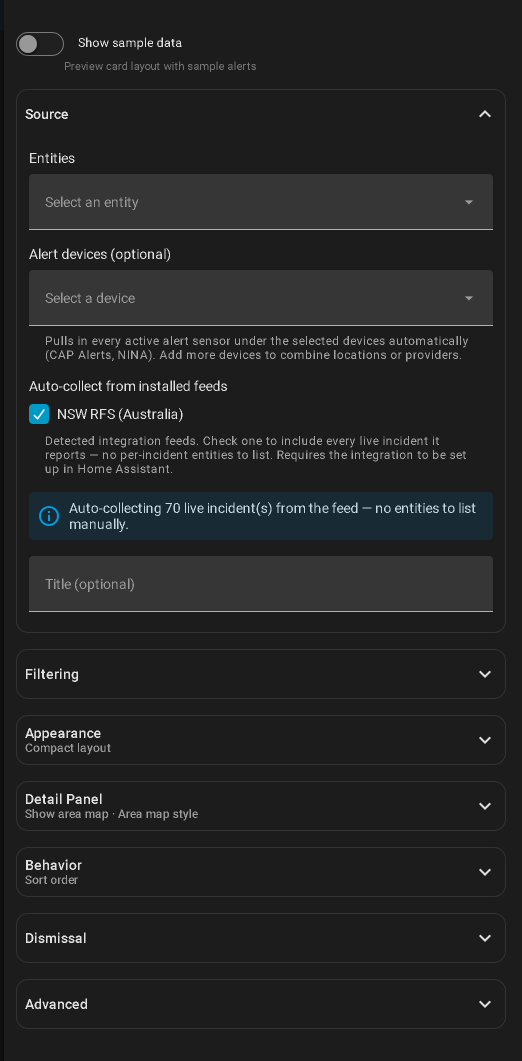
Settings are grouped into panels. Source is open; the rest start collapsed, and a collapsed panel's header names the settings you have changed. Open one and the changed rows are marked, each with a link back to its default, so a customised card still reads at a glance.
To hand-write it instead, add a Manual card with the YAML above. From there, see the configuration reference for the full option list.
A more complete example
A typical setup filters to the alerts you care about and sorts the worst to the top:
type: custom:weather-alerts-card
entity: sensor.nws_alerts_alerts
title: Weather Alerts
layout: compact
sortOrder: severity
minSeverity: moderate
colorTheme: nws
Verifying it works
Severe weather is, happily, rare — so an empty card is the normal state and tells you little. Two things to check:
- The card renders a "No active alerts" banner rather than an error. That means the entity was found and parsed.
- Turn on
hideExpired: falsetemporarily. Recently expired alerts render dimmed, which is usually enough to confirm the pipeline end to end without waiting for a storm.
If a source breaks, the card does not quietly fall back to "no alerts" — it shows a degraded badge naming the broken sensor. See unavailableBehavior in the configuration reference.
Migrating to v3
v3.0.0 removed backwards-compatibility shims that were deprecated in v2. Upgrading from v1.x or v2.x needs these changes.
1. Card type rename (v1.x only)
# Before
type: custom:nws-alerts-card

# After
type: custom:weather-alerts-card
2. headline key removed (v1.x only)
headline was replaced by deduplicateHeadlines in v2:
# Before
headline: true

# After
deduplicateHeadlines: true
3. Manual installs: resource filename changed
| Before | After |
|---|---|
/local/nws-alerts-card.js | /local/weather-alerts-card.js |
HACS users need do nothing — HACS manages the resource path.